SSP scholarship is a government scholarship that is for engineering, medical, dental, veterinary, BA, BSc, and other degree students.
It is a digital system of the Karnataka government. It is made to provide lower-class students with financial aid. It forces students not to leave education due to financial reasons.
The students are given a discount not only on fees but also provided with a stipend. This helps them fulfill their expenses.
Fee Discounts
Monthly Stipend
Expense Support
The State Scholarship Portal provides transparency so that students can complete their registration process through a digital method.
The government makes an announcement every year at the beginning of a new session.
Students are given a proper time period so that they can apply for it.
How to Apply for NSP Scholarship in 5 Simple Steps
Follow these steps carefully to complete your application without errors
1
Register
Create your account on the official NSP portal with valid details including Aadhaar and bank information.
2
Fill Form
Complete the application form with accurate personal, academic, and family income details.
3
Upload Docs
Upload scanned copies of required documents in specified format (PDF/JPG, under 500KB each).
4
Get Verified
Your institute verifies the application and documents submitted. Check status regularly.
5
Receive Payment
After final approval, scholarship amount is transferred directly to your bank account via PFMS.
Registration Step-by-Step Process
There are two stages in the SSP scholarship online application. First, you have to create an account for registration. This stage covers the initial setup of your account.
Within a few steps, you will be able to apply for the scholarship.
There are some common mistakes that you should avoid while applying.
1
Open SSP Scholarship Website
Open any browser and search for “SSP Scholarship,” and you will get many search results.
2
Access Official Website
Click on the official site and you will land on this page.
https://ssp.karnataka.gov.in/
Scholarship Options Available
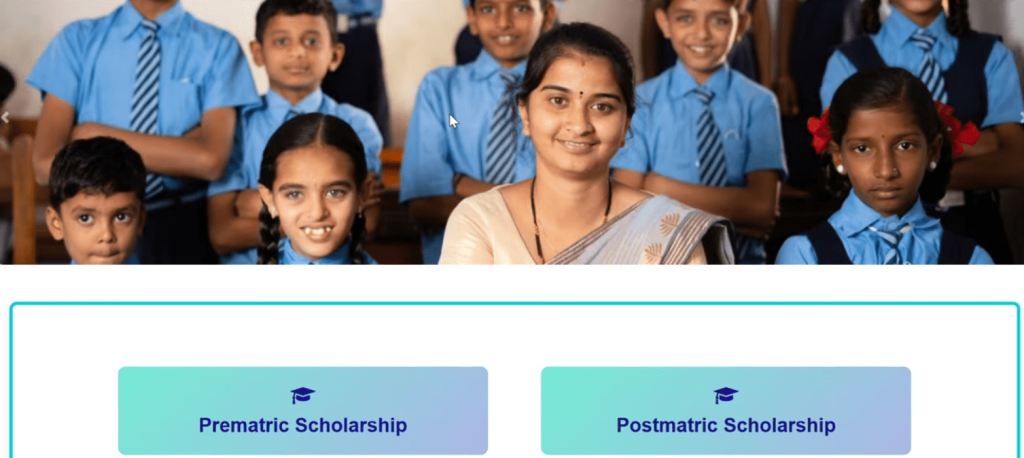
Pre-metric Scholarship
For students studying before 10th standard
Post-matric Scholarship
For students studying after 10th standard
Here, you will see ‘Click here to create a new account’ for both pre- and post-metric students.
1
Account Creation Button
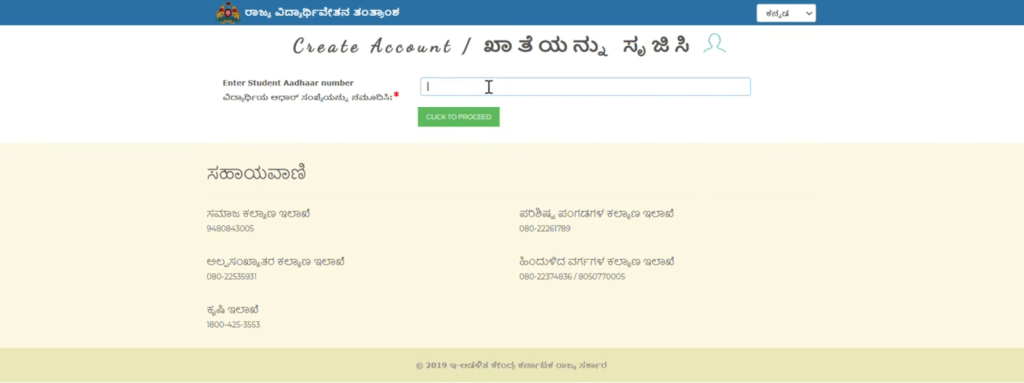
Click on the account creation button, and it will redirect you to the Aadhaar card number page.
Create New Account
2
Aadhaar Number Entry
Enter your student Aadhaar number and proceed by clicking the next button.
Aadhaar Verification Process
The system will check the Aadhaar to see whether it has been registered previously.
Registration Check Result
If registered, you will see your SSP ID; otherwise, you will not be able to proceed.
3
Complete Registration
On the next page, the portal will require your details for final account setup.
Required Information
Mobile Number
Email Address
SSP ID (if previously registered)
After this, your account will be ready, and you can now log in to apply for the scholarship.
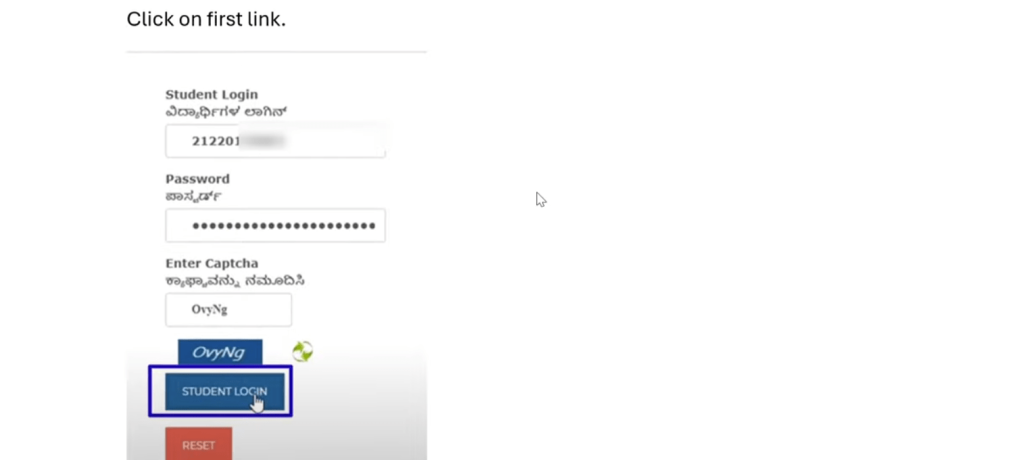
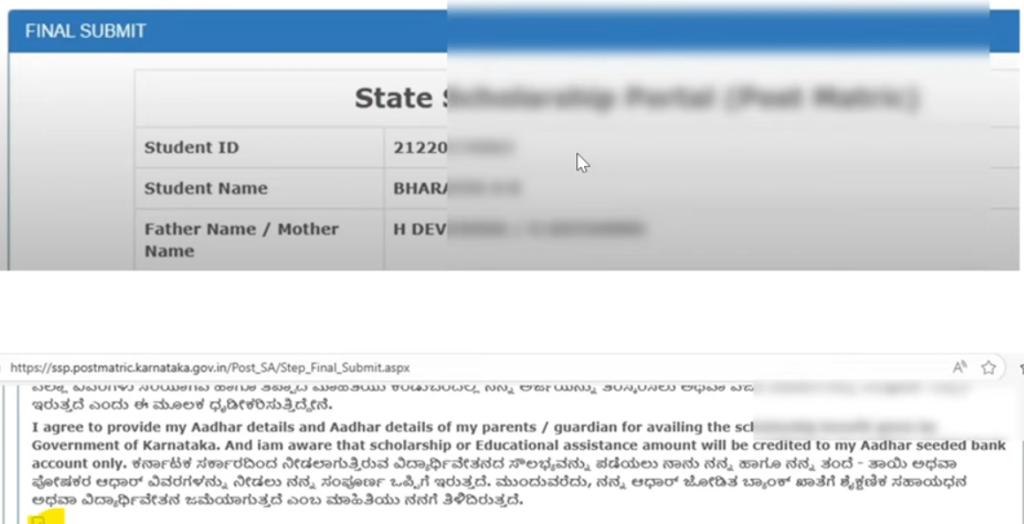
Now, click on the ‘Scholarship’ button, and it will redirect you to the scholarship application page. Enter your student login/SSP ID and password. Type the captcha and click the STUDENT LOGIN button.
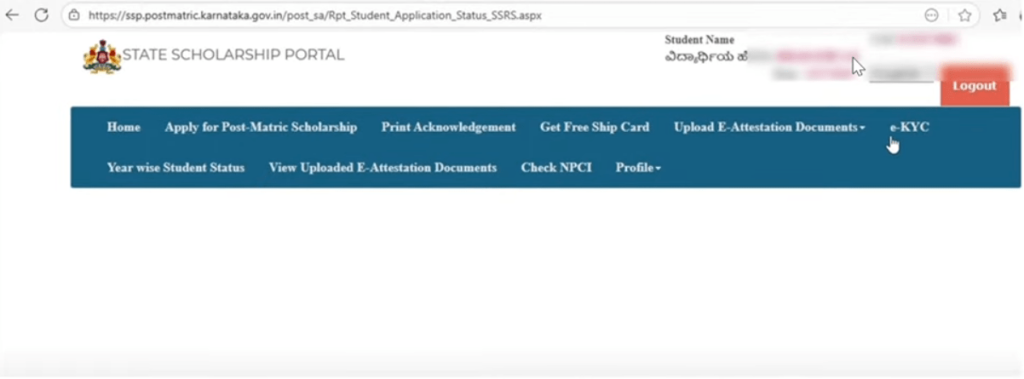
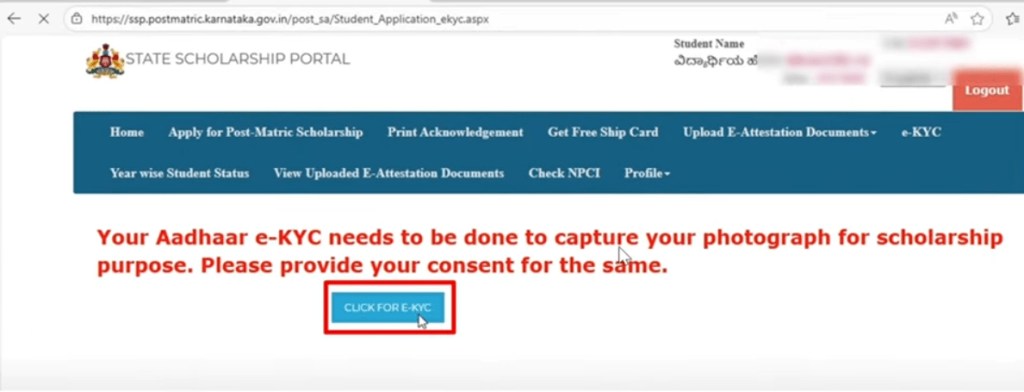
A new page will appear in front of you, as shown below. The right side will display your student’s name and other details. First, you need to complete eKYC here.
Click on the eKYC button, and it will prompt you to CLICK FOR E-KYC. It will inform you that your Aadhaar e-KYC needs to be completed to capture your photograph for scholarship purposes.
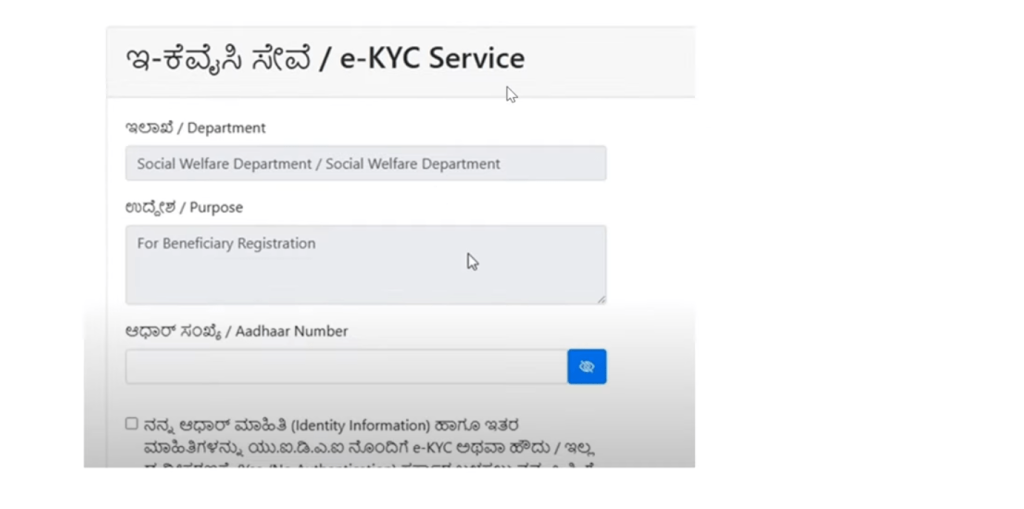
After clicking the eKYC button, you will be asked to enter your Aadhaar number. Click on the checkbox. Choose the OTP option for authentication and click it to receive the OTP.
You will receive a six-digit OTP on your mobile number linked with Aadhaar. Enter the six digits and click the Submit button.
A photo will appear after clicking the Submit button. Click on the displayed photo, correct it if necessary, and save it. A pop-up notification will appear confirming that the data has been saved successfully. Your eKYC is now complete.
Now the question arises: what should I do after eKYC? The simple answer is to apply for your scholarship. On the home page, click on Apply for Post-Matric Scholarship.
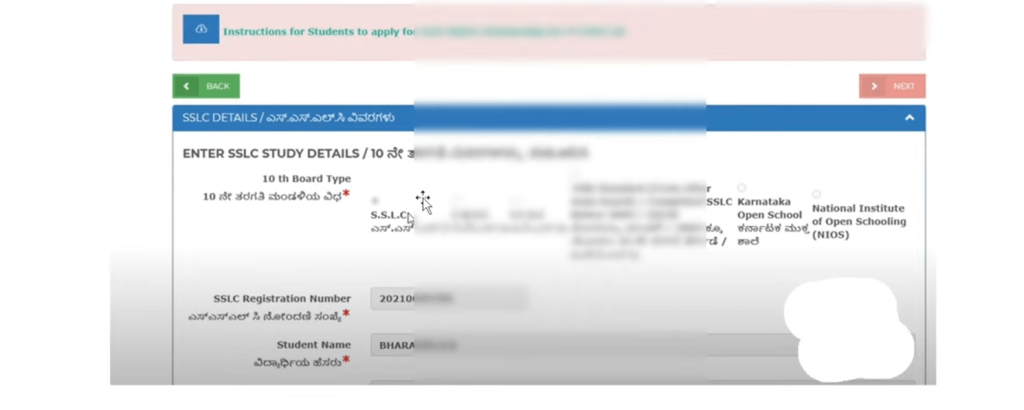
The next page will appear with four steps. The first step focuses on entering personal, study, and college-related details.
Step 1: Personal & Study Details
Enter your personal information, including name, gender, email ID, and permanent address.
Confirm whether you are a resident of Karnataka; only state residents are eligible.
Provide your academic details: previous marks (SSLC, PUC, Diploma), course enrolled, and year of study.
Ensure that all information is accurate and matches the official documents, as errors may delay or result in the rejection of your application.
At the end, it will ask you, “Are the displayed details correct?” You are given two options: Yes and No. If all the details shown above are correct, click Yes, then save and proceed. You will receive a message confirming that the data has been saved successfully.
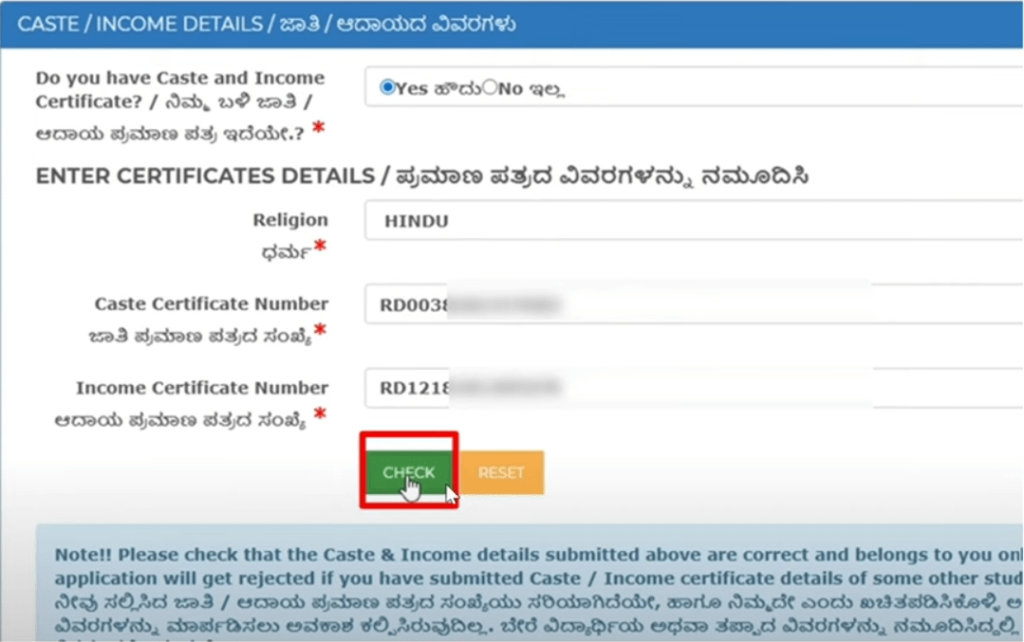
Income, Caste, and Other Mandatory Details
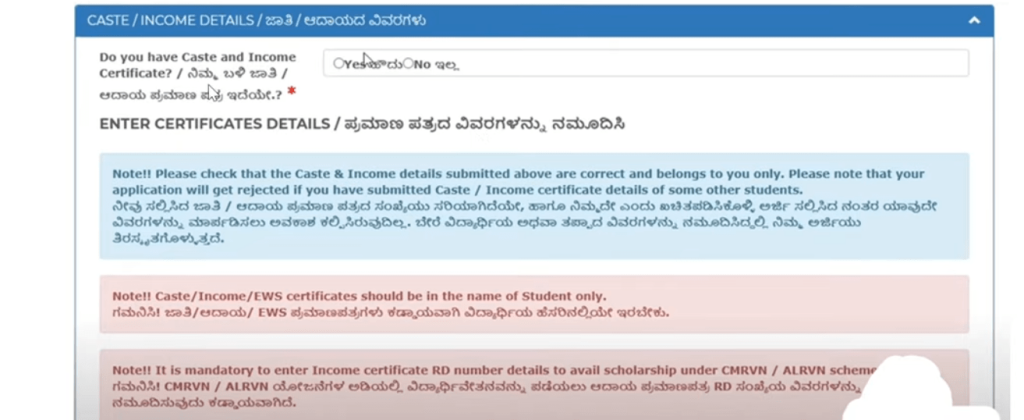
1. Income Details
Enter your Income Certificate number.
Ensure the certificate is valid and attested by the appropriate authority.
The portal may auto-fetch some data, but you must verify it manually.
Income information is essential to determine eligibility and calculate the scholarship amount.
2. Caste and Religion
Select your religion accurately (Hindu, Muslim, Christian, Jain, etc.).
Enter your Caste Certificate number exactly as mentioned in the certificate.
This step is mandatory for all students, regardless of gender.
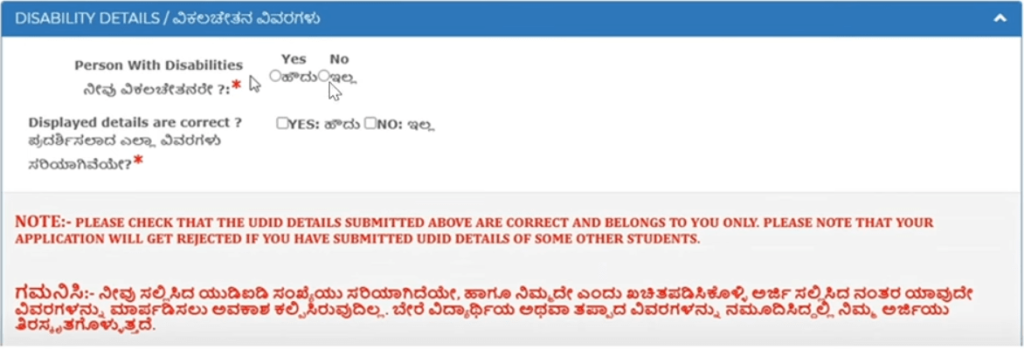
3. Disability Details (If Applicable)
If you are physically handicapped, enter the type of disability and the certificate number.
Students without disabilities can skip this section.
This information is only used to allocate the scholarship correctly for students with verified disabilities.
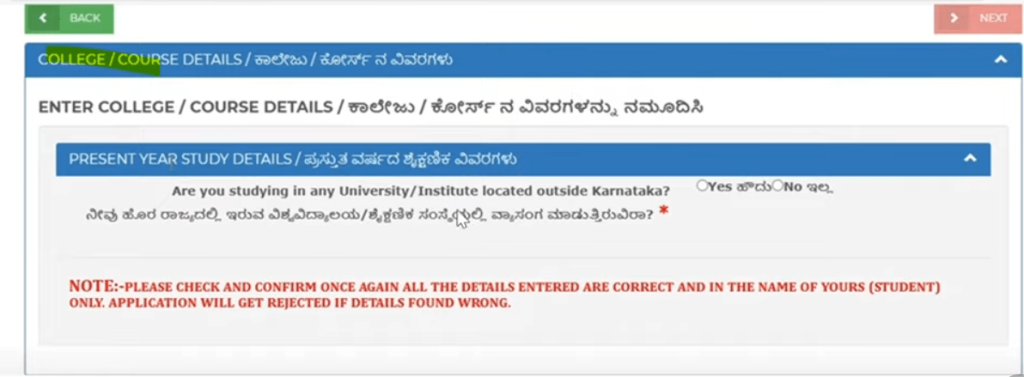
Step 2: College Details
Provide your college information: name, course start date, and type of admission (government, management, or private).
For professional courses:
Engineering students: select the correct session (e.g., September 2025).
Medical/Dental students: select the admission month according to KE/NEET counseling results.
Only colleges within Karnataka are eligible; students studying outside the state cannot apply through this portal.
Verify the given details and click on the Yes button.
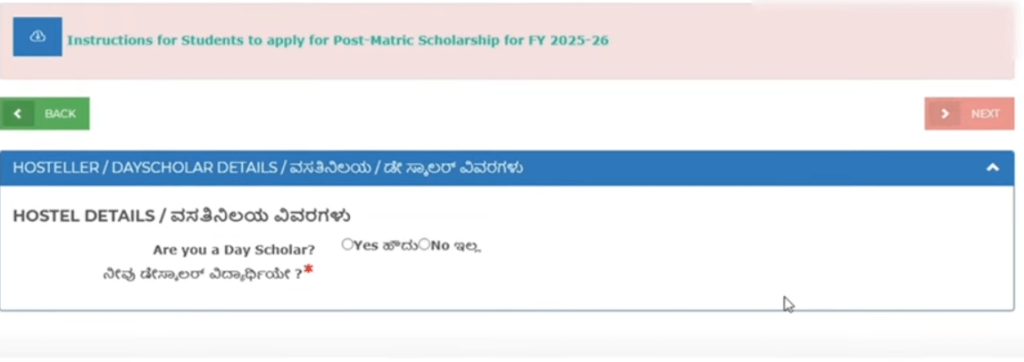
Step 3: Hostel / Day Scholar Details
Indicate whether you are a hosteller or a day scholar.
If a hosteller, specify whether it is a government or private hostel.
This information is required for scholarship fund allocation and verification of living arrangements.
Step 4: Submission & Acknowledgment
Review all the entered information carefully.
Click “Save & Proceed” after each step to ensure data is securely stored.
After completing all steps, generate and download the Acknowledgment PDF.
This acknowledgment acts as proof of submission and should be retained for future reference.
Documents Required for SSP Scholarship 2025–26
1
Caste Certificate (RD number, Karnataka Govt)
2
Income Certificate (RD number, Karnataka Govt)
3
Student Aadhaar Card
4
Parent/Guardian Aadhaar Card
5
10th / 12th / Previous Semester Marks Card
6
Previous Year Marks Card / Pass Certificate
7
Current Academic Year Fee Receipt
8
Student Bank Passbook (NPCI-linked mandatory)
Who is eligible to apply for the SSP Scholarship
The SSP Scholarship is a financial aid program for students in Karnataka. It is mandatory to check eligibility so that the scholarship can’t be rejected.
A student is eligible only if all four conditions below are true:
1
The student is a bona fide resident of Karnataka
2
The student belongs to the SC, ST, or OBC category
3
The student is studying in a UG or PG course
4
The student is enrolled at St Joseph’s University, Bengaluru
Important Notice
If even one condition is not met, the student should not apply, as the application will be invalid under this notice.
Scholarship Amount and Benefits
The fees differ from course to course. Students will be awarded according to their course, category, SC, and ST. The ST and SC students will receive enough. They will get around ₹2,500 to ₹13,500.
SC/ST
Medical & Dental Students
₹13,500
For SC/ST category students pursuing medical or dental courses
Engineering
Engineering Students
₹20,000
For general category engineering students
Medical
MBBS, Dental, Eye Studies
₹15,000
For general category medical field students
Other Degree Programs
BA, BSc, and other degree students scholarship amounts
₹4,000 – ₹13,000
Regular Degrees
₹3,000
Some Students
₹6,000
Some Students
It is a college fee that student directly receive in their bank account.
Mandatory Aadhaar Linking
It is mandatory to link your Aadhaar with your bank account. If you don’t link, you will not receive the amount. The status remains Under Process.
Category / Course Type
Updated Scholarship Amount
ST & SC Students
₹2,500 to ₹13,500
SC/ST Medical, Dental Students
₹13,500
Engineering Students (General Category)
₹20,000
MBBS, Dental, Eye Studies Students (General Category)
₹15,000
BA, BSc, and Other Degree Students
₹4,000 to ₹13,000
Some Students
₹3,000 or ₹6,000
OTR Registration Steps
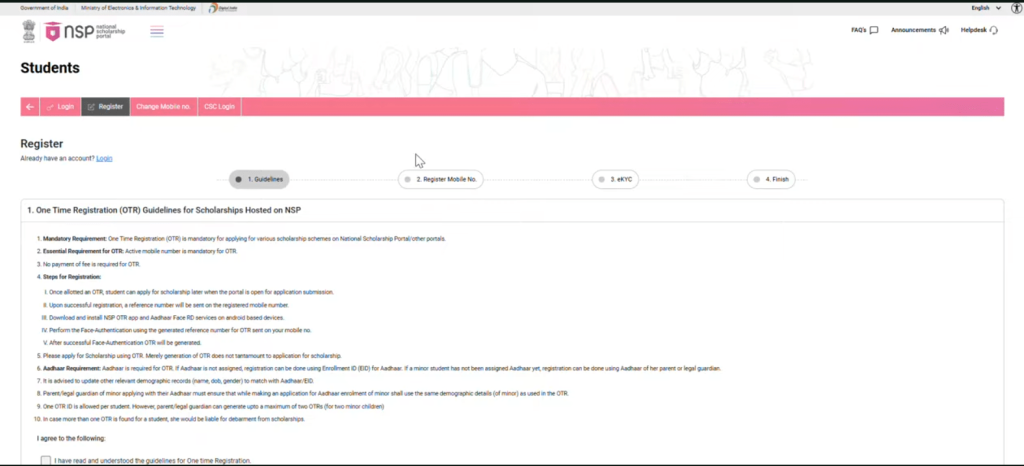
Open the official SSP portal login page and click on NSP-OTR Notification. This will open the NSP registration portal.
Click on the Registration button at the top of the page and check the box.
On the next page, you will be asked to enter your mobile number.
You will receive an OTP on your number.
Enter the OTP, type the captcha, and click Verify.
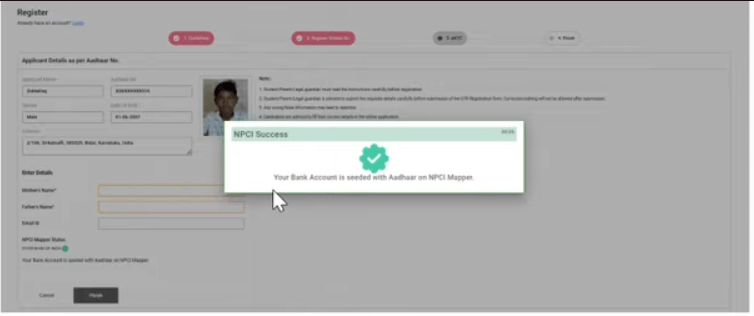
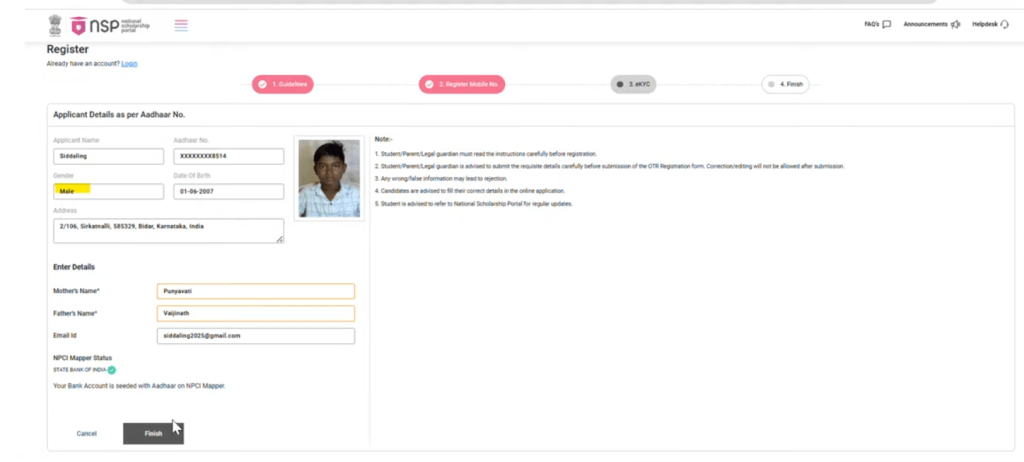
A message saying NCPI Success will be displayed.
Next, you have to add your mother’s and father’s names, email, and click on finish.
NSP OTR Registration Process
1
Download the NSP OTR App
Go to the Play Store and search for “Aadhaar Face RD”.
Install the app on your mobile device.
2
Open the NSP OTR App
Launch the app. It will automatically open your account interface.
3
Start Registration
Click on “Register NSP” to start the registration process.
Fill in your mobile number linked with Aadhaar.
Complete the OTP verification sent to your registered mobile number.
Enter the captcha and click Verify.
4
Personal Details
Enter your mother’s name, father’s name, and email ID.
Click Finish to complete basic registration.
5
Face Verification
Use the app’s face recognition feature.
Blink your eyes once or twice as instructed.
After successful verification, you will get an OTR number displayed in green.
6
Password Setup
The app will send a password to your registered mobile.
Log in using your OTR number and password.
Change the password if needed.
7
Account Linking
Link your bank account and Aadhaar so that the scholarship amount can be transferred automatically.
8
Completion
Once all steps are completed, you are ready to apply for the SSP scholarship.
Your OTR number will now be used for all further scholarship application steps.
Important Reminder
Ensure your mobile number is linked with Aadhaar before starting. Keep your Aadhaar card and bank account details ready for smooth registration.
E-KYC Information for SC Students
Is E-KYC compulsory for SC students?
E-KYC is compulsory for all SC students. If a student does not complete E-KYC, their application will be rejected.
Important: Without E-KYC, scholarship application will be rejected
What is E-KYC?
E-KYC is a Biometric Authentication that contains:
Biometric Authentication Components
Fingerprint
Iris Scan
The purpose of this is to verify the student’s identity. It is used to prevent fake or incorrect entries. The student’s record is directly verified through the government database.
Where can SC students complete E-KYC for the SSP Scholarship?
Students can complete biometric E-KYC through government centres. These centres include:
Government E-KYC Centres
Aadhaar Centre
Bangalore One Centre
Social Welfare Office
NES Office Location
NES Office Road, Yelahanka, Bengaluru – 54
Why does the SSP Scholarship get rejected and what are the common mistakes?
Many scholarship applicants have not completed some basic steps. Medical and engineering students do not have the USN or admission order number. The counselling number is the actual admission number. If this number is not provided, the application is rejected.
1
Missing Admission Details
Medical and engineering students do not have the USN or admission order number. The counselling number is the actual admission number. If this number is not provided, the application is rejected.
2
Incorrect PUC Numbers
Secondly, many students’ PUC numbers do not match automatically. Students do not enter them correctly, and the application is rejected.
3
Aadhaar-Bank Account Not Linked
Another cause of rejection is not linking your Aadhaar card with your bank account.
4
Missing NSP OTR Registration
The NSP OTR registration is mandatory for ST and SC students. If a student does not register for OTR on the NSP portal, the application will be rejected.
5
Unverified Documents
Some students do not read their bonafide certificate, admission confirmation, and other important documents.
💡 Always apply before the last day of the scholarship. Link all your correct information to ensure your scholarship is not rejected.
Tips for a Successful Application
As students, we must ensure that we fulfil all requirements. However, sometimes we fail and make minor mistakes that later lead to rejection. Here are some professional tips that will help you avoid all kinds of errors.
Keep a ready document:
This is a major mistake made by students while applying for the scholarship. Students often open the form without completing their documents, which results in incorrect file uploads.
You must have all these documents before proceeding with the application.
Required Documents
Aadhaar Card
Caste Certificate
Income Certificate
Bank Passbook
Marks Card
Fee Receipt
Verify Every Step:
Most of the applications are rejected because of this step. Students are in a hurry and don’t have time to review the given information.
Common Verification Mistakes
Spelling Mistake
Wrong Aadhaar Card Number
Wrong Bank Account
Wrong IFSC Code
💡 These minor mistakes can lead to big problems. The solution is to verify and read every step carefully.
Regularly Check SSP Portal
Applying is not enough. The actual issues occur after submission. Sometimes documents are rejected, and sometimes a correction notice or verification pending message is shown.
It is necessary to check the portal twice a week.
Keep Acknowledgement Copy
You will receive an acknowledgement copy after applying. It is not only a receipt but also evidence of your application. It may be required in offices.
Make sure to print it or save it as a PDF on your mobile phone.
Where must students submit offline documents after online SSP submission?
Students need to submit their offline documents as per the official instructions.
Submission Address
Admin Office
Counter No. 3
St. Joseph’s University
Bangalore
Important: Submit documents at Counter No. 3 specifically
Important Notice
If offline documents are not submitted, the scholarship may be stopped or rejected.
Dr. Rajesh Kumar
SSP Scholarship Consultant & Education Advisor
With over 8 years of experience guiding Karnataka students, I provide
verified SSP Scholarship information and proven application strategies.
Scholarship Expert
Education Consultant
Karnataka Specialist
Frequently Asked Questions
What is the counselling number in the SSP scholarship?
The counselling number is a unique identifier issued during the admission process.
It is used to verify academic details.
Is biometric verification required for the SSP scholarship?
Yes, biometric verification is mandatory. E-KYC is compulsory for both pre-
and post-matric students.
What is the college verification process in the SSP scholarship?
It involves the Nodal Officer. Your uploaded documents are checked against your
application to ensure accuracy.
What is the SSP scholarship amount for the general category?
The scholarship amount varies by course level and other formalities. Generally,
pre-matric level students receive ₹1,000–₹7,000.
What documents are required for the SSP scholarship for engineering students?
It includes the Aadhaar card, income certificate, caste certificate, fee receipt,
and college ID.
What should I do if the SSP scholarship OTP is not received?
Check whether your mobile number is linked with Aadhaar. Use the Resend OTP
option and ensure proper mobile network signal.
Is a USN required for the SSP scholarship?
Yes, a Unique Student Number (USN) is required for student verification on the portal.
How can I apply for the SSP scholarship without a USN number?
You can register on the scholarship portal using your Aadhaar details.
The USN can be updated later once it is issued.